
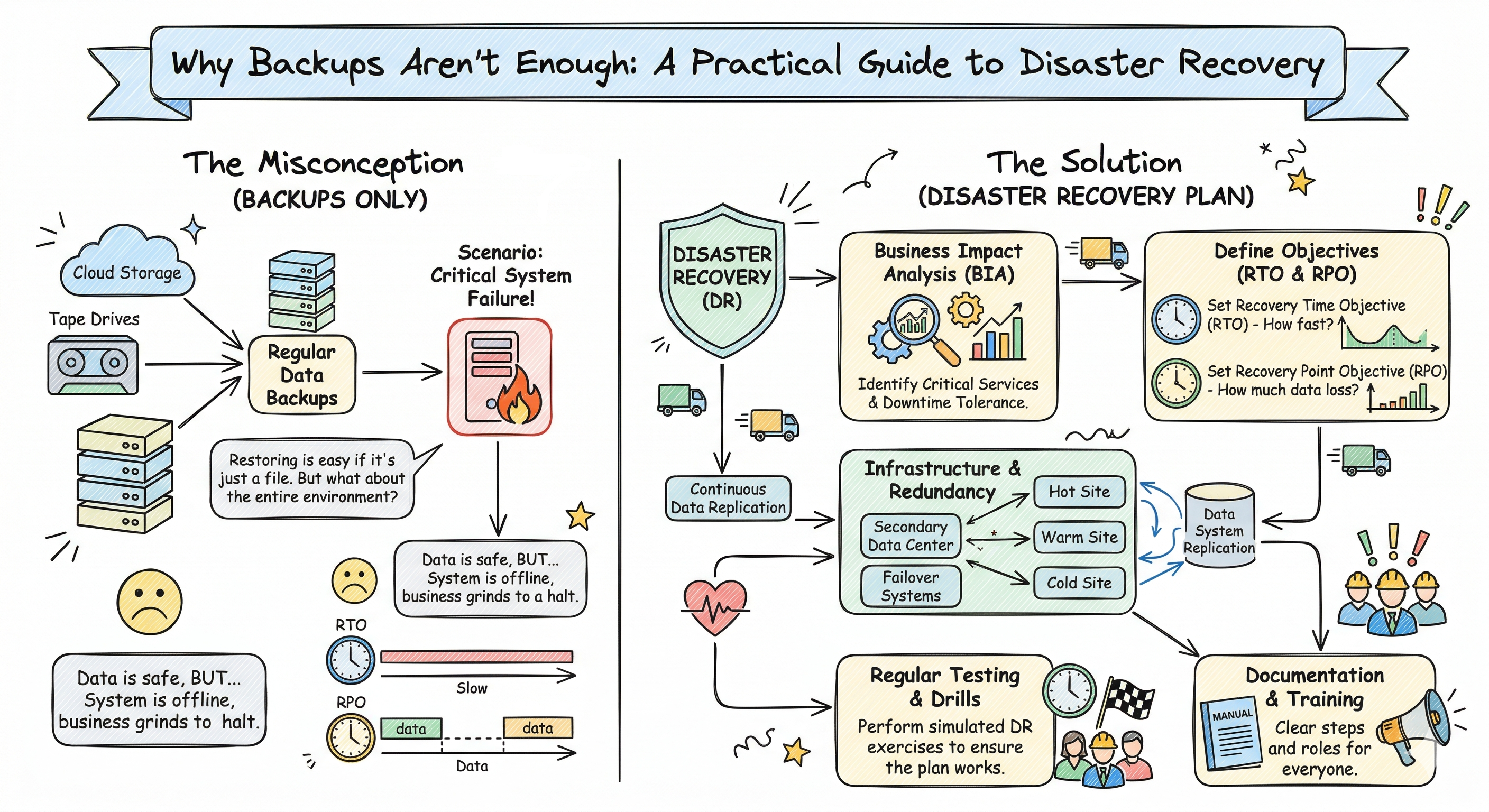
 “We have backups.”
I hear this a lot when talking to founders about disaster recovery. And honestly? It used to comfort me too.
Then I watched a company try to restore from backup for the first time under pressure.
The backup existed. It was recent. It was stored safely offsite. But the restoration took 14 hours - far longer than anyone expected. The business lost an entire day of operations, thousands of dollars in revenue, and significant customer trust.
They had backups. What they didn’t have was a recovery plan.
After 10 years of building backend systems, I’ve learned this: a backup is just a file. Recovery is a process. And the gap between the two is where companies get into trouble.
In this post, I’ll walk you through what actually determines how fast you can recover, how many copies of your data you really need, and the questions most teams never think to ask until it’s too late.
The Two Numbers That Matter: RTO and RPO
When we talk about disaster recovery, there are two metrics that matter more than anything else. If you don’t know these numbers for your system, you’re not ready.
Recovery Time Objective (RTO)
RTO answers a simple question: How long can you afford to be down?
This isn’t a technical question - it’s a business question. The answer depends on what your system does and who relies on it.
- An internal tool used by 5 people might have an RTO of 24 hours
- An e-commerce site during a sale might have an RTO of 15 minutes
- A payment processing system might have an RTO of seconds
Here’s what most people don’t realize: your RTO isn’t just about how fast you can restore. It’s about how fast you must restore before the business impact becomes unacceptable.
I’ve seen companies with “daily backups” who assumed they could restore in an hour. When they actually tested, it took 8 hours. Their RTO was 2 hours. They had a 6-hour gap they didn’t know about.
Recovery Point Objective (RPO)
RPO answers a different question: How much data can you afford to lose?
If you back up every night at 2 AM and your system crashes at 1:59 AM the next day, you’ve lost almost 24 hours of data. Is that acceptable?
- A blogging platform might tolerate losing 24 hours of draft posts
- A financial system can’t lose even a single transaction
- A user-generated content platform might fall somewhere in between
Your RPO determines your backup frequency. If you can’t lose more than 1 hour of data, you need backups at least every hour. If you can’t lose any data, you need real-time replication.
The Trade-off
Here’s the uncomfortable truth: lower RTO and RPO cost more money.
- Hourly backups to cloud storage: relatively cheap
- Real-time replication across data centers: expensive
- Near-zero RTO with automatic failover: very expensive
The question isn’t “what’s the best RTO/RPO?” It’s “what RTO/RPO does our business actually need, and are we willing to pay for it?”
How Long Does Recovery Actually Take?
This is where most disaster recovery plans fall apart. Teams assume restoration will be fast because “the backup is right there.” But restoration involves more than just copying files.
Let me break down what actually happens during a recovery, and roughly how long each step takes.
The Recovery Timeline
1. Detection Time (5 minutes - 2 hours)
Something is wrong, but you might not know it immediately. A database might be corrupted but still running. A backup might be failing silently. The first step is realizing you have a problem.
What affects this: Monitoring quality, alerting thresholds, time of day (2 AM incidents take longer to notice).
2. Decision Time (15 minutes - 2 hours)
Once you know something is wrong, you need to decide: do we restore from backup? This isn’t always obvious. Can we fix the issue without restoring? Is the backup clean, or might it also be affected?
What affects this: Having clear criteria for when to restore, having someone with authority to make the call.
3. Retrieval Time (5 minutes - 4 hours)
Getting the backup files. If they’re in cloud storage, this might be quick. If they’re on tape in an offsite facility, this could take hours. If someone needs to drive to a data center, longer.
What affects this: Backup location, network speed, whether credentials and access procedures are documented.
4. Restoration Time (30 minutes - 24 hours)
The actual process of restoring data. This is where database size really matters.
What affects this: Data volume, compression, network speed, database type, whether you’re doing a full or partial restore.
5. Verification Time (30 minutes - 4 hours)
You’ve restored the data. But is it correct? Is it complete? Did anything get corrupted? Verification is often skipped under pressure, but it’s critical.
What affects this: Having verification scripts, knowing what “correct” looks like, having test data to compare against.
6. Recovery Time (15 minutes - 2 hours)
The data is restored and verified. Now you need to get applications running again, update connection strings, clear caches, and make sure everything is pointing at the right database.
What affects this: Runbook quality, automation level, how many systems need reconfiguration.
Realistic Time Estimates by Database Size
| Database Size | Restoration Time | Total Recovery Time |
|---|---|---|
| 10 GB | 5-15 minutes | 1-2 hours |
| 100 GB | 30-60 minutes | 2-4 hours |
| 500 GB | 4-6 hours | 6-10 hours |
| 1 TB | 8-12 hours | 12-18 hours |
| 5 TB+ | 24-48 hours | 36-72 hours |
These are rough estimates based on what I’ve seen in production. Your actual times will vary based on infrastructure, network speed, and database technology.
The key insight: restoration time grows non-linearly with data size. A 500GB database doesn’t take 5x longer than a 100GB database - it might take 8x longer because of how databases handle large restores.
How Many Replications Do You Need?
One backup is not enough. I’ve seen backups fail in too many ways to trust a single copy.
The 3-2-1 Rule
There’s a widely accepted principle in data protection called the 3-2-1 rule:
- 3 copies of your data (the original + 2 backups)
- 2 different storage types (e.g., local disk + cloud storage)
- 1 offsite location (in case your primary site is unavailable)
This isn’t paranoia. It’s based on how backups actually fail:
Single point of failure: If you only have one backup and it’s corrupted, you have nothing.
Storage type failure: I’ve seen cloud storage outages last hours. I’ve seen local NAS devices fail without warning. Having two storage types protects you from both.
Site failure: If your office floods or your data center loses power, local backups don’t help. You need something offsite.
Why Backups Fail
Here are the ways I’ve seen backups fail in production:
-
Silent corruption: The backup runs successfully, but the data is corrupted. You only discover this when you try to restore.
-
Ransomware: Modern ransomware specifically targets backups. If your backups are on the same network as your production systems, they might be encrypted too.
-
Credential loss: The backup exists, but no one has the password to access it. This happens more often than you’d think.
-
Incomplete backups: The backup job was set up incorrectly and missed critical tables or files.
-
Storage exhaustion: Backups grew until they filled available storage, then started failing silently.
-
Version incompatibility: You need to restore to a new server, but the backup format isn’t compatible with the new version of your database software.
Each of these is a reason to have multiple copies, tested regularly.
Replication Strategies
Not all copies are created equal. Here are the common approaches:
Full Backups
Every backup is a complete copy of all data. Simple to restore from, but storage-intensive and slow to create.
Best for: Small databases, systems with low change rates.
Incremental Backups
Each backup only contains data that changed since the last backup. Efficient on storage, but restoration requires the last full backup plus every incremental since then.
Best for: Large databases with frequent backups, storage-constrained environments.
Differential Backups
Each backup contains all data that changed since the last full backup. Middle ground between full and incremental.
Best for: Balancing backup speed and restoration simplicity.
Real-Time Replication
Changes are replicated to a standby system as they happen. Near-zero RPO, but complex and expensive.
Best for: Systems that can’t afford data loss, high-availability requirements.
For most business applications, I recommend: weekly full backups + daily incremental backups + real-time replication for critical systems.
The Restoration Runbook: What You Actually Need
At 2 AM, when something has gone wrong and the CEO is asking when the system will be back, you don’t want to be figuring out restoration steps for the first time.
You want a runbook.
A runbook is a step-by-step guide that anyone on your team can follow. It turns a high-stress, high-stakes situation into a checklist.
What a Good Runbook Includes
1. Decision Criteria
When should you restore from backup vs. try other fixes? This should be explicit:
“If the database is corrupted and cannot be repaired within 30 minutes using standard recovery commands, initiate restoration from the most recent verified backup.”
2. Step-by-Step Restoration Procedure
Every command, every click, every password. Assume the person following this has never done it before:
1. SSH to backup server: ssh admin@backup.company.com
2. Navigate to backups: cd /backups/production/daily
3. Find most recent backup: ls -lt | head -5
4. Copy backup to production server: scp 2024-04-13.sql.gz prod-db-01:/tmp/
5. ... (continue with actual restore commands)
3. Verification Steps
How do you know the restore worked? Include specific checks:
“After restoration, run these queries and verify the results match expected values:
- SELECT COUNT(*) FROM users; (should be ~50,000)
- SELECT MAX(created_at) FROM orders; (should be within 1 hour of incident time)”
4. Contact Information
Who needs to be notified? Who can authorize extended downtime? Include phone numbers, not just email.
5. Communication Templates
Pre-written messages for stakeholders:
“We are currently experiencing a system outage and are working to restore service. Current estimated recovery time: [X] hours. Next update in: [Y] minutes.”
6. Rollback Plan
What if the restoration makes things worse? How do you undo it and try a different approach?
Where to Store the Runbook
Not on the system you might need to restore. The runbook should be accessible even if your entire production environment is down.
Options: printed copy, separate documentation system, offline file on someone’s laptop.
Testing Your Backups: The Step Most People Skip
I’ll say it again: an untested backup is just a file taking up space.
You don’t know if your backup works until you’ve restored from it. You don’t know how long restoration takes until you’ve timed it. You don’t know if your runbook is complete until someone else has followed it.
How Often to Test
- Full restoration test: Quarterly, at minimum
- Partial restoration test: Monthly
- Automated verification: Daily (scripts that restore to a test environment and verify)
What to Test
-
Can you restore at all? The backup file opens, the database accepts it, the data is readable.
-
Is the data complete? All tables present, all rows accounted for, no silent corruption.
-
How long does it take? Time the full process and compare to your RTO.
-
Can someone else do it? Have a different team member follow the runbook without help.
-
Does the application work after? Restoring the database is useless if the application can’t connect to it.
Documenting Test Results
Keep a log of every test:
Backup Test - April 1, 2026
- Backup tested: daily-2026-03-31.sql.gz
- Restoration time: 2 hours 15 minutes
- Issues found: Runbook step 4 was unclear about which server to use
- RTO met: No (target was 2 hours)
- Action items: Update runbook, investigate faster restoration method
This log becomes evidence of due diligence and helps you improve over time.
Questions to Ask Before You Need to Restore
If you can’t answer these questions quickly, you have work to do:
About your RTO/RPO:
- What’s our maximum acceptable downtime?
- What’s our maximum acceptable data loss?
- Are these numbers documented and agreed upon by stakeholders?
About your backups:
- Where are all our backups located?
- How often do they run?
- How long do we keep them?
- Who has access to restore them?
About your restoration process:
- Have we ever done a full restoration?
- How long did it take?
- Is our runbook up to date?
- Has someone other than the primary admin tested it?
About your testing:
- When was the last time we verified our backups?
- What did we find?
- Have we fixed the issues?
The Takeaway
Having backups is not a disaster recovery plan. It’s one component of a plan.
A real disaster recovery plan includes:
- Clear RTO and RPO targets
- Multiple backup copies in different locations
- A tested, documented restoration procedure
- Regular verification that backups work
- A team that knows what to do when something goes wrong
The companies that recover quickly from disasters aren’t the ones with the biggest backups. They’re the ones who’ve practiced restoration.
When did you last test yours?